We use cookies necessary for the site to work and, with your consent, for: preferences, statistics, relevant offers and maps.
Your preferenceswe remember your choices from one visit to the next
Un site mai bunwe see what works and what doesn't, without identifying you
Oferte potriviteads for products you're interested in, not random ones
Google Mapslocations and pickup points shown on the map
You can change your choice anytime from “Cookie settings", in the page footer. Cookie policy
Cookie settings
You choose what we store on your device. Strictly necessary cookies always stay active. All the details are in Cookie policy.
Strict necesare
The site does not work without them: they keep you logged in, keep your cart and the steps of a booking, and protect your forms. They cannot be turned off.
Always active
Ce folosim (5)
Sesiunea · noi
Recognizes you from one page to the next: the cart, your account, the steps of a booking. prima-shop-session · 2 hours from the last action
Form protection · noi
Prevents a form from being submitted on your behalf from another website. XSRF-TOKEN · 2 ore
Stay signed in · noi
Only if you choose to stay signed in on this device. remember_web_…, remember_bookora_… · 400 de zile
Your cookie choice · noi
Remembers what you chose here, so we don't ask you on every page. acord_cookie · 6 luni
Anti-bot protection · Cloudflare (Turnstile)
Checks, without image puzzles, that contact forms are not submitted by bots. Cloudflare's own technical storage · how long the review takes · their policy
Preferences
They remember your choices between visits, so you don't have to make them again each time.
What we use
Product display · noi
Products are shown as a list or a grid, as you last chose. ps_view · 1 an
Statistics
They show us, without identifying you, how many visitors we have, which pages are searched for and where people get stuck, during an order or a booking — so we can improve the site. Without consent, Google receives only anonymous signals, without cookies.
What we use
Google Analytics 4 · Google Ireland Ltd.
Visit and sales statistics: pages viewed, products, cart, orders. _ga, _ga_* · up to 2 years · their policy
Marketing
They help us find out which ads bring in orders and show you, on other sites, products you viewed with us. Without consent, we do not measure ads on your device and you do not receive personalized ads from us.
What we use
Google Ads (conversions and remarketing) · Google Ireland Ltd.
Links an order to the ad you came from and builds remarketing lists with the products you viewed. When you order, your e-mail and phone number are sent to Google only in encrypted (hashed) form, for conversion matching. _gcl_au, _gcl_aw, cookie-uri Google (de exemplu IDE) · up to 13 months, set by Google · their policy
Maps
Maps are provided by Google Maps. When they load, Google receives your IP address and may set its own cookies. Without consent, we only show you a link to the map or the list of locations.
What we use
Google Maps · Google Ireland Ltd.
Shows the map: the business location on BookOra, and in the store the point chosen when entering the address and the easybox lockers at checkout. cookie-uri Google (de exemplu NID) · up to 6 months, set by Google · their policy
5 signs it's time to automate your practice's appointment booking
19 August 2026The Prima Shop Team9 min read
It's Tuesday, 10:40. You're halfway through a treatment, the reception phone rings for the third time in ten minutes, and the assistant writes an appointment on a sticky note because the schedule book is open to a different page. In the evening, someone copies everything back into the notebook. If this sounds familiar, you're not disorganized: you've outgrown a system designed for a smaller practice.
Automated booking doesn't mean giving up people or the phone. It means the repetitive work — finding a free slot, writing it down, confirming, checking who came and who didn't — takes care of itself, while your team takes care of patients. Below are five clear signs that the time has come, how to spot them this very week and what actually changes when you switch to an online schedule.
Patients call when it suits them: in the morning before work, on their lunch break, in the evening or on the weekend. In other words, exactly when you have someone in the chair, when the practice is closed or when reception is already on another call. A missed call rarely calls back: the person moves on to the next practice on the list and books there.
How to tellOpen your practice phone's call log and count the missed calls from the last 7 days, especially those outside business hours. Each one is a person who wanted to come to you.
The solution isn't another phone, but a second front door that's open around the clock. The patient goes to your website or your catalog page, chooses the service, the specialist, the day and a free time slot, and the appointment shows up directly in the calendar. Booked slots can't be selected, so there's no double booking.
cabinet-stomatologic-zambet.bookora.ro
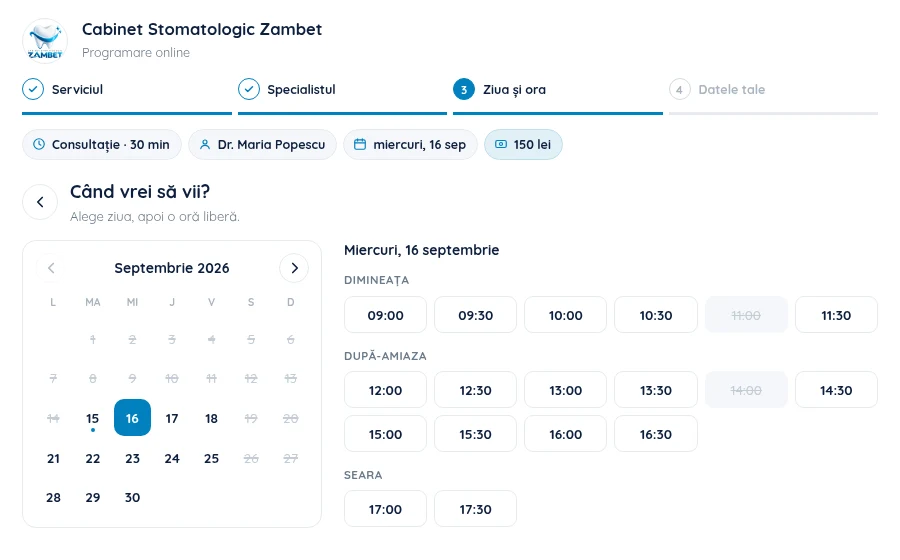
Step 3 of 4 of the form: the patient sees only the free slots of the chosen specialist, grouped into morning, afternoon and evening. Booked slots appear crossed out. There are four steps, and the phone number can be verified with an SMS code to prevent fake bookings.
And for those who still prefer to call, paid plans also include the AI phone assistant: it answers on a dedicated number, using the practice's name, in Romanian, sees the calendar in real time and books the appointment. In the schedule, it appears with the label "from the assistant", so you know where the patient came from.
2
Sign 2
The schedule exists in only one place
The notebook at reception, a spreadsheet on the practice computer or the assistant's phone: if the schedule lives in one place, it also lives in one person's head. The doctor can't see from home who's first tomorrow, two people can give out the same slot, and the assistant's day off becomes a day of guesswork.
How to tellAsk yourself: if the person who keeps the schedule is out tomorrow, can someone tell, within two minutes, who is coming at 11:30 and to which specialist?
BookOra dashboard · Calendar
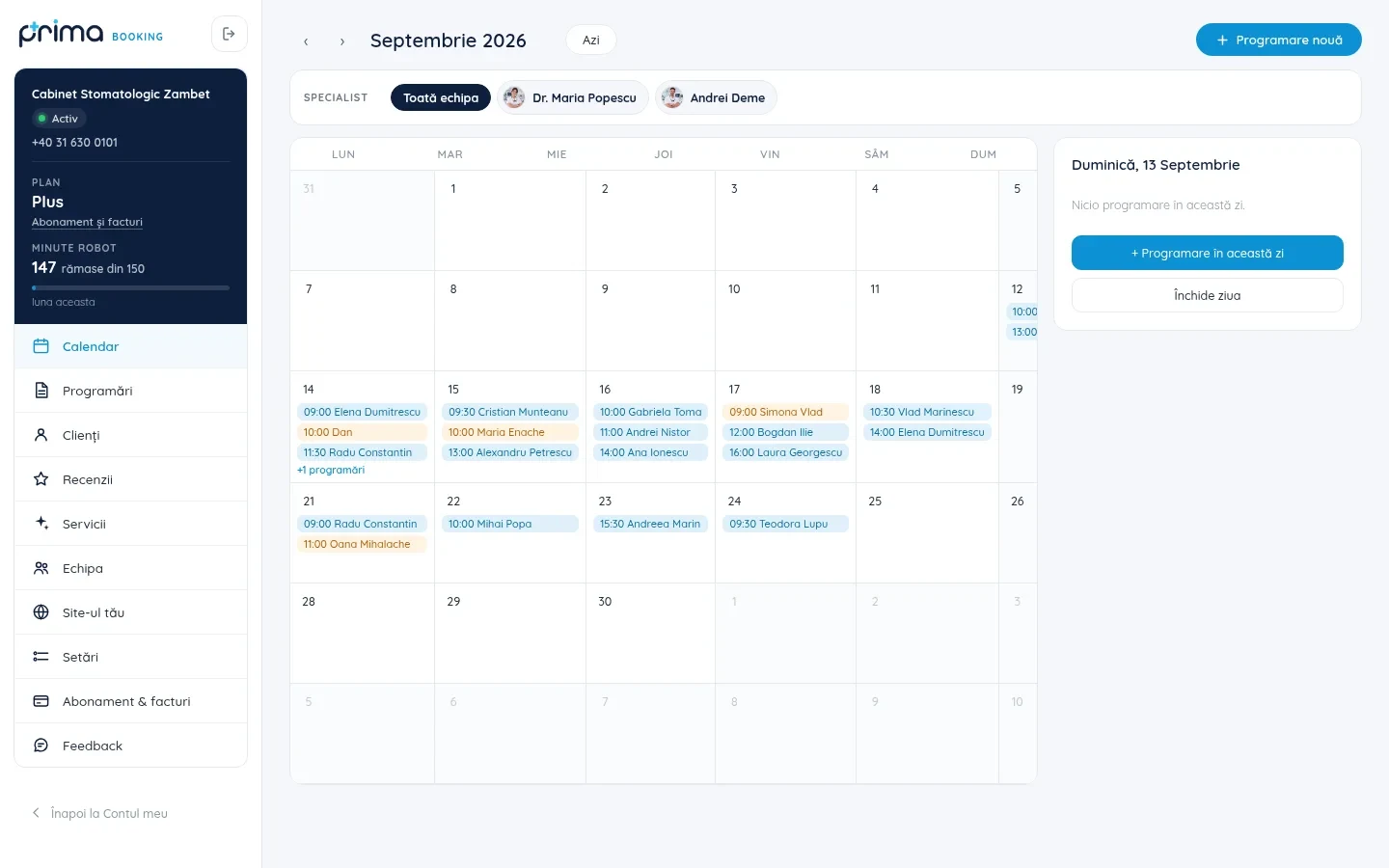
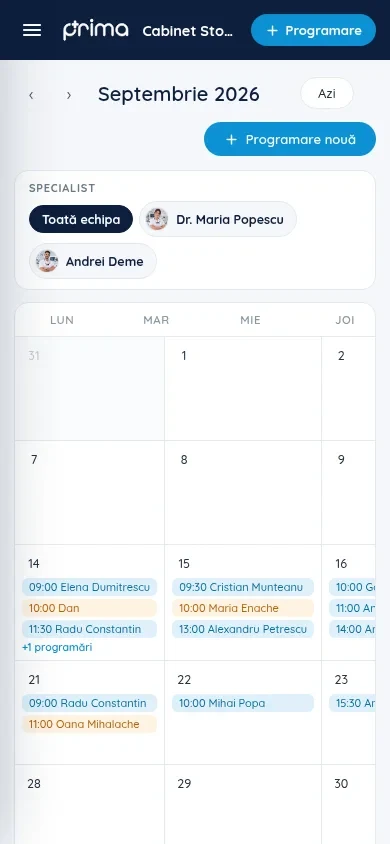
The same calendar, on computer and phone. Filter by "Whole team" or a single specialist, see the selected day on the right and add an appointment from your phone in seconds, with no app to install.
What changes
Each specialist has their own services, prices and hours; patients can't choose a time when the doctor isn't working.
Bookings from the website, the catalog and the assistant, as well as those entered manually by reception, all go into the same calendar.
The whole team sees the same schedule, in real time, from anywhere.
3
Sign 3
Patients forget, and gaps in the schedule never get filled
An appointment written on a slip of paper the patient has lost is an empty hour in your day. And when someone lets you know they're not coming, the freed-up slot usually stays empty, because nobody has time to call other patients to offer it.
How to tellCount how many hours were left empty last week because of patients who didn't show up or canceled late. Multiply by the fee for one consultation: that's what your current schedule is costing you.
When patients book themselves, they chose the time, so they remember it more easily. Right after confirmation, they can add the appointment to their own phone calendar — with a QR code, a calendar file or directly in Google Calendar — and they also get directions to the practice. Their phone reminds them of the appointment, not your reception.
And a freed-up slot no longer waits for a phone call: it shows up again as available in the online form, where the next patient looking can take it.
4
Sign 4
You can't tell what your week looks like without counting by hand
How many appointments do you have this week? How many are still waiting for confirmation? How full is each doctor's schedule? On paper, the answer takes an evening with a pen in hand. And without these numbers, it's hard to decide whether to hire someone else, extend your hours or close on a particular day.
BookOra dashboard · Appointments
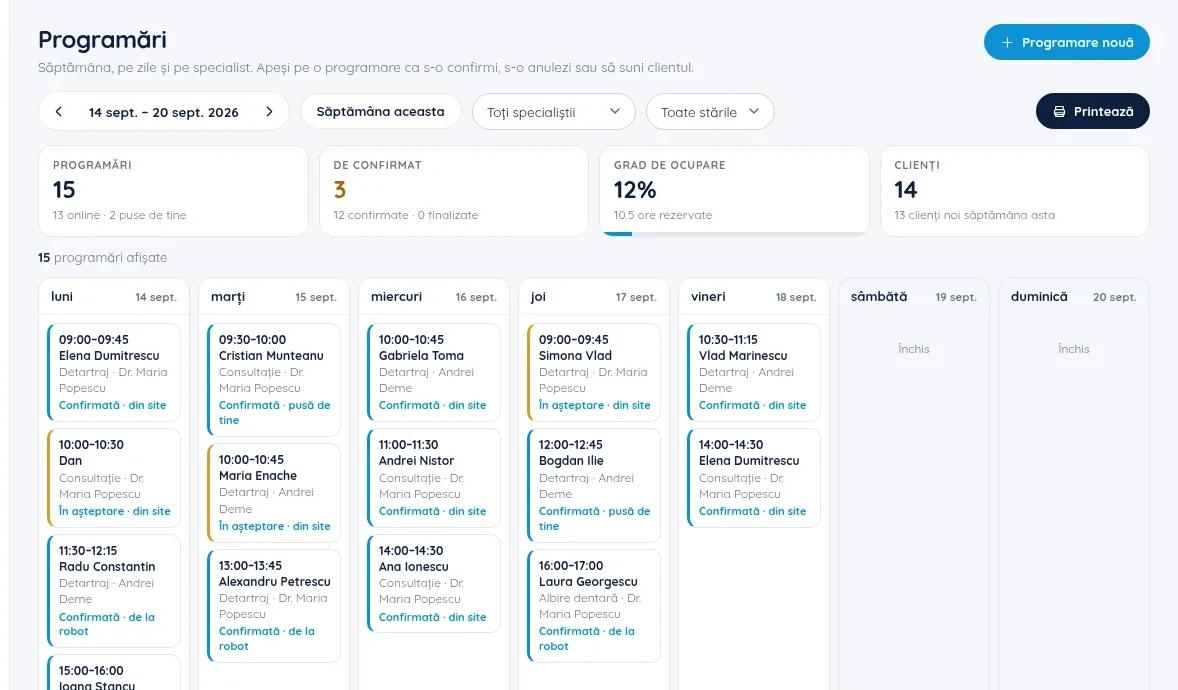
Your week at a glance: how many appointments you have (and how many came in online), how many are waiting for your confirmation, the occupancy rate and how many clients you have that week. Each appointment shows the service, the specialist, the status (confirmed, pending) and the source: website, assistant or entered by you.
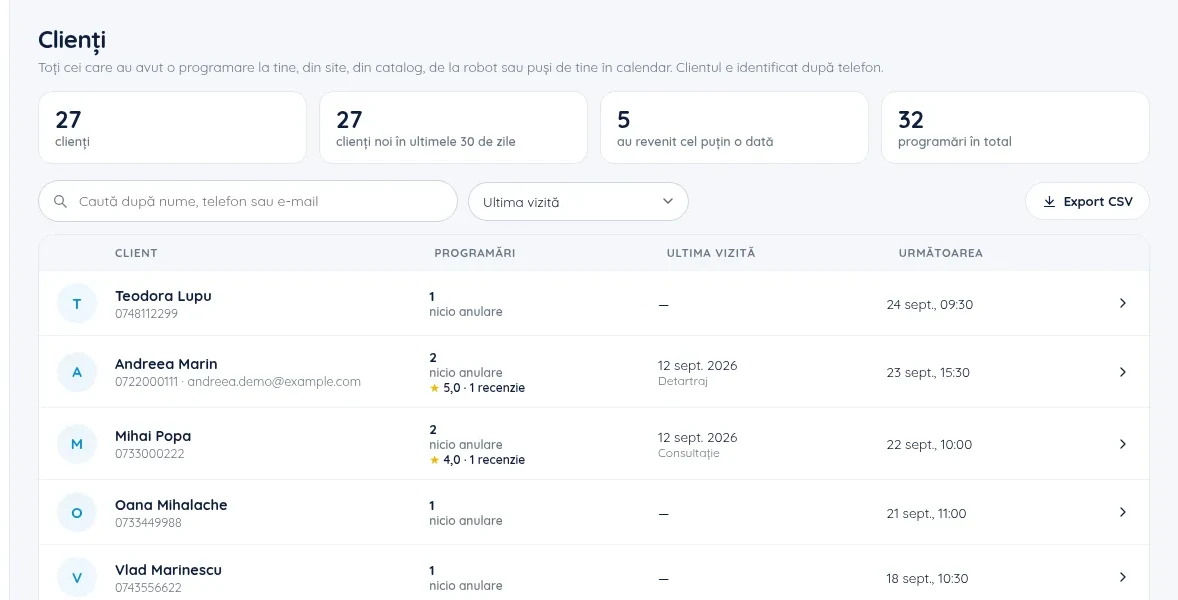
And patients stop being names scattered across notebooks. Each one has a record with all their appointments, the review they left and their phone number one click away; you can search by name or phone number and export the list at any time.
BookOra dashboard · Clients
The client list builds itself from appointments: last visit, next appointment, number of reviews left and new clients from the last 30 days.
5
Sign 5
New patients can't find you (or can't make up their minds)
A new patient compares two or three practices before calling. They look at reviews, services and how easy it is to book. If you have dozens of satisfied patients but no online reviews, you're invisible to them. And asking for reviews "whenever we remember" doesn't work.
How to tellSearch for your practice on Google, as a new patient would. How many reviews do you have from the last three months? Can someone book from there without calling?
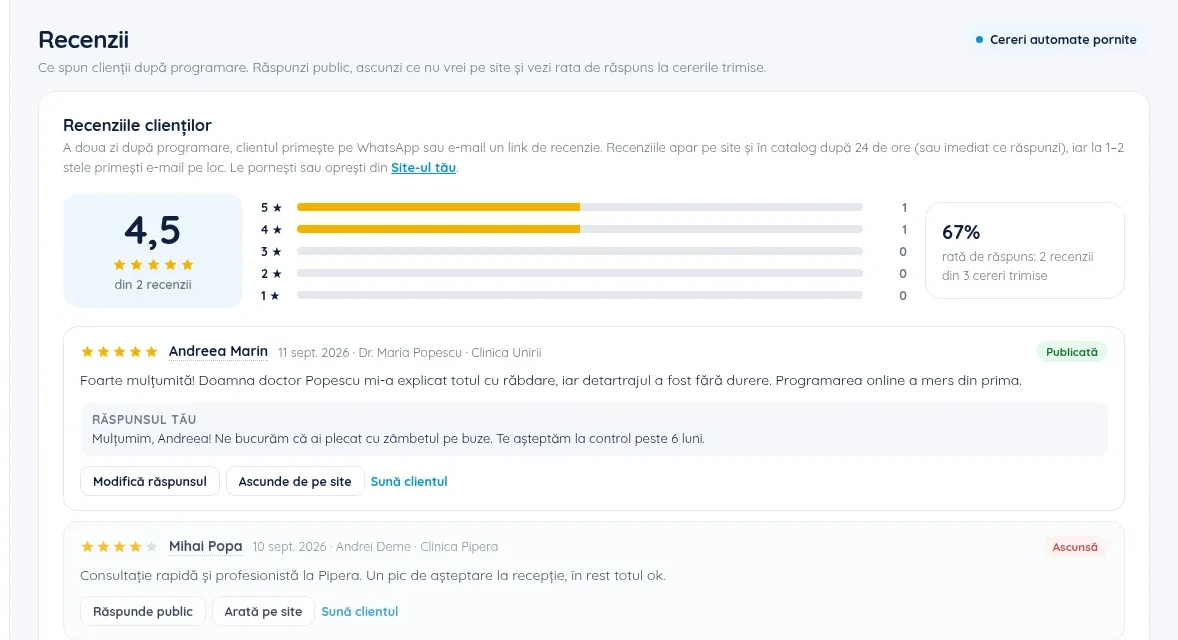
BookOra dashboard · Reviews
Automatically requested reviews: the day after the appointment, the patient receives a personal review link via WhatsApp or e-mail. Reviews come only from people who actually had an appointment, and you reply publicly and see the response rate for the requests sent.
In addition to reviews, the practice gets a page in the BookOra catalog, where patients search by service and location, and its own website at your-name.bookora.ro, with built-in booking and reviews marked up the way Google reads them.
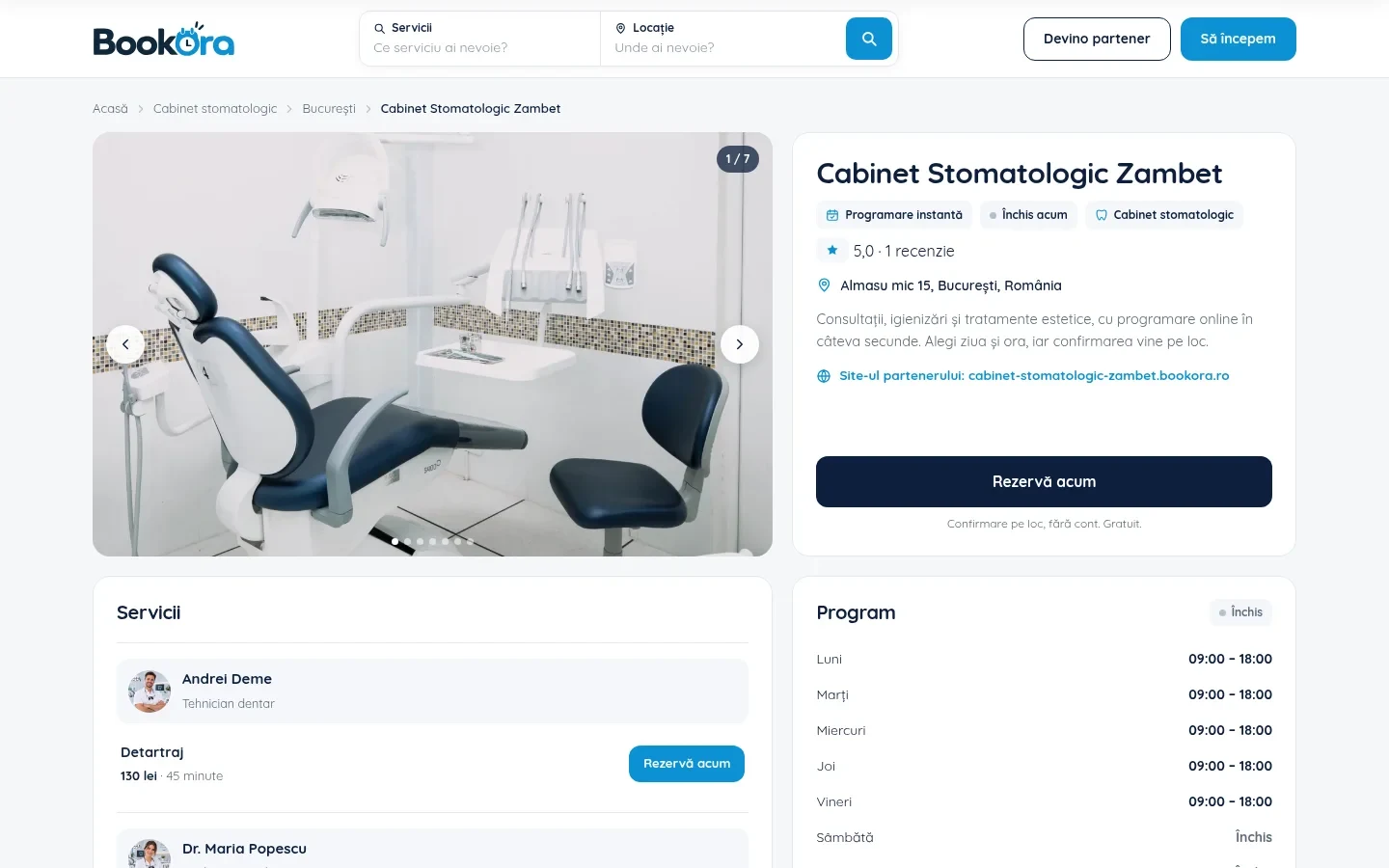
bookora.ro · the practice's catalog page
The catalog page: photos, review rating, address, services with prices and hours, and the "Book now" button leads straight to the form.
Traditional schedule vs. automated booking, in short
What matters
Notebook or phone
Automated booking
When patients can book
Only during reception hours
Around the clock, from the website, the catalog or via the assistant
Double booking
Possible, depends on someone paying attention
Impossible: only free slots can be selected
Who sees the schedule
Whoever has the notebook in front of them
The whole team, on computer and phone
Appointment in the patient's phone
No, only what they remember
Yes, with one click after confirmation
Reviews
When you remember to ask
Requested automatically the next day, only from real patients
Weekly numbers
Counted by hand
On screen: appointments, to confirm, occupancy rate
The two-minute test
I had at least one missed call in the past week.
The schedule is kept by a single person or in a single place.
I had empty slots because of patients who didn't show up.
I can't quickly say how many appointments I have this week.
I get less than one new review a month.
If you checked two or more, your schedule is already costing you time and patients. The good news: you can change it in an afternoon, not in a months-long project.
How to switch to automated booking without shutting down your practice
Create your accountThe practice's name, address and phone number. The Free plan includes the website, the catalog page and 50 online bookings per month, no card required.
Add your services and teamThe duration and price of each service, the specialists and what each one does.
Set your hoursWorking days and hours, breaks and days off. The form shows only what's truly available.
Move over existing appointmentsAdd them from the dashboard with "New appointment", so the whole calendar is in one place from day one.
Share the linkOn your website, on Facebook and Instagram, on Google, in your e-mail signature and in your WhatsApp confirmation message.
See how it would look for you
BookOra is the booking app from the Prima Shop family: a calendar by specialist, a free website of your own, a catalog page, automatically requested reviews and a phone assistant on paid plans.
Older patients don't want to book online. What do I do with them?
They keep calling, just as before. Reception adds them to the same calendar in seconds, and on paid plans the assistant can take calls when nobody answers. Online booking is an extra door, not a replacement for the phone.
How long does it take to get started?
The account, services and hours can be filled in over an afternoon. The website at your-name.bookora.ro is ready as soon as you save, and you can add existing appointments gradually.
How much does it cost?
The Free plan includes the website, the catalog page and 50 online bookings per month, with no card and no trial period. The phone assistant and the other advanced features are on paid plans; you can see them on the Pricing page.
Can I use the schedule on my phone?
Yes. The dashboard opens in your phone's browser, with no app to install: you can view the calendar, add, confirm or cancel appointments and reply to reviews.
What happens to the slot when a patient cancels?
The slot becomes available again in the online form, so the next patient looking can book it, without you having to call anyone.